 Bestseller
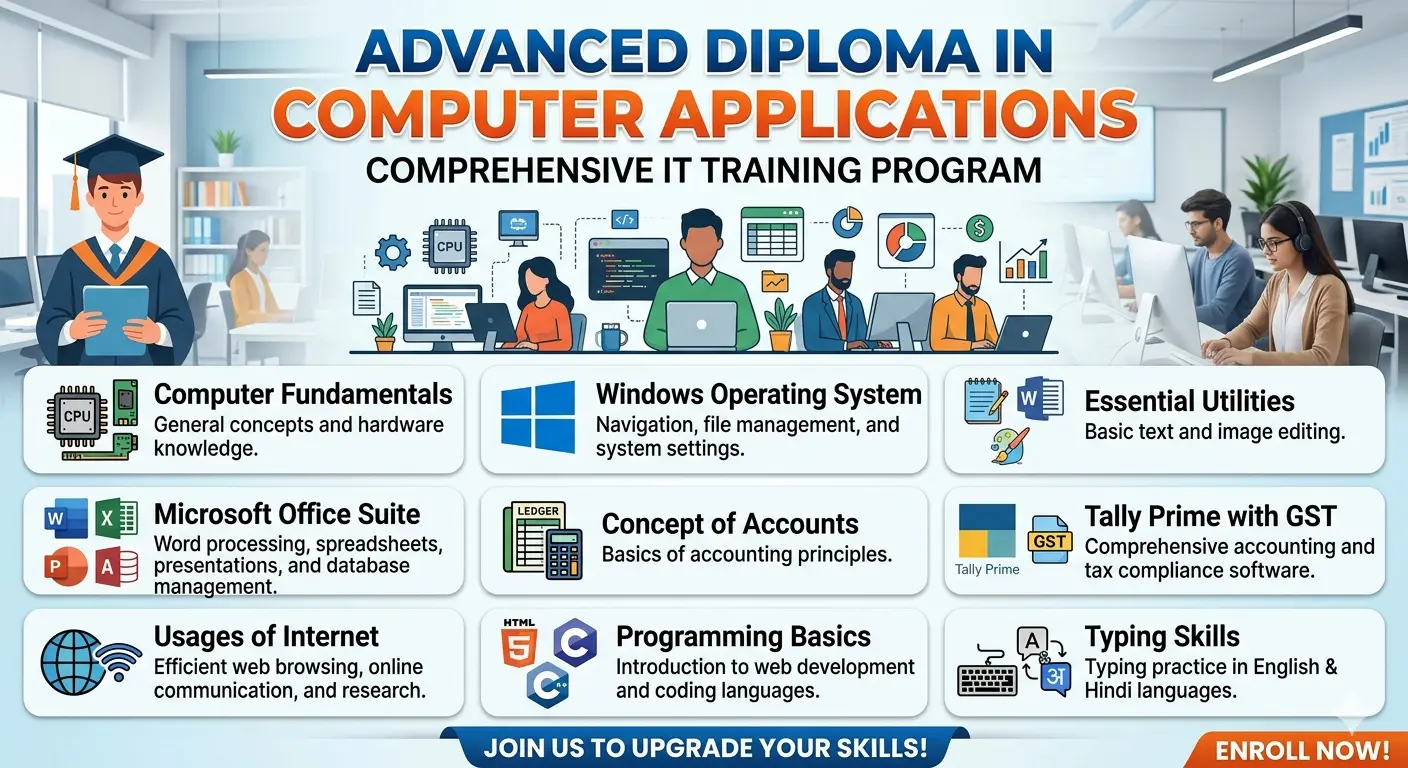
Advanced Diploma in Computer Applications
Total Duration: 150 Sessions
Objective: To equip students with foundational to advanced IT skills, ranging from office automation and accounting to basic programming and multilingual typing.
Module 1: IT Foundations & Operating Systems (30 Sessions)
This module builds the core hardware and software concepts required to navigate modern computing environments safely and efficiently.
Module 2: Microsoft Office Suite (50 Sessions)
The core corporate skill set focusing on document creation, data analysis, presentations, and database management.
Module 3: Financial Accounting & Tally (30 Sessions)
Designed to make students job-ready for accounting and bookkeeping positions.
Module 4: Internet Usages & Programming Basics (30 Sessions)
Moving from internet literacy to building basic logic and web structures.
Module 5: Multilingual Typing Mastery (10 Sessions)
Integrated throughout the entire course timeline as a practical habit.
📑 ADCA Session-by-Session Syllabus
Module 1: IT Foundations & Operating Systems (Sessions 1 – 30)
💻 Computer Fundamentals (10 Sessions)
**Session 1:** Introduction to Computers, History, and Generations of Computers.
**Session 2:** Classification of Computers (Micro, Mini, Mainframe, Super).
**Session 3:** Understanding Hardware vs. Software; Components of a CPU.
**Session 4:** Input Devices (Keyboard, Mouse, Scanners) and Output Devices (Monitors, Printers).
**Session 5:** Memory & Storage: Primary (RAM, ROM) vs. Secondary Storage (HDD, SSD).
**Session 6:** Number Systems (Binary, Octal, Decimal, Hexadecimal conversion).
**Session 7:** Concepts of Booting, BIOS, and System Software vs. Application Software.
**Session 8:** Computer Virus, Malware, Antivirus, and Basic Troubleshooting.
**Session 9:** External Storage Devices and Peripheral installation.
**Session 10:** Theoretical Revision & Objective Type Test on Fundamentals.
🪟 Windows Operating System (10 Sessions)
* **Session 11:** Introduction to Graphical User Interface (GUI) & Windows Desktop Interface.
* **Session 12:** Working with Files and Folders (Creating, renaming, moving, and deleting).
* **Session 13:** Windows Explorer shortcuts and managing directory structures.
* **Session 14:** Understanding Windows Control Panel: User accounts, date/time, and regional settings.
* **Session 15:** Configuring Display Settings, Sound, and System Properties.
* **Session 16:** Managing device drivers, Task Manager, and Resource Monitor.
* **Session 17:** Disk Management tools: Disk Cleanup, Defragmentation, and Disk Partitioning concepts.
* **Session 18:** Installing and uninstalling software safely.
* **Session 19:** Working with Windows built-in tools (Snipping tool, Calculator, Sticky notes).
* **Session 20:** Practical Lab Exam on Windows File Organization & Settings.
🎨 Essential Accessories: Notepad, Wordpad, & MS Paint (10 Sessions)
* **Session 21:** **Notepad:** Introduction to plain text editing, extensions (.txt), and basic keystrokes.
* **Session 22:** **Wordpad:** Introduction to Rich Text Format (.rtf), font settings, and paragraph formatting.
* **Session 23:** Inserting objects, date/time, and basic alignment in Wordpad.
* **Session 24:** **MS Paint:** Introduction to canvas, toolbox, shapes, and color pallets.
* **Session 25:** Advanced tool utilization in Paint (Selection modes, resizing, skewing, and color picker).
* **Session 26:** Image file formats (.jpg, .png, .bmp) and basic photo cropping.
* **Session 27:** Creating layout designs and banners using MS Paint tools.
* **Session 28:** Integrated project: Drafting a formal layout in Wordpad with custom MS Paint designs.
* **Session 29:** Practical Lab Assignment on Utilities.
* **Session 30:** Module 1 Revision & Viva Voce.
### Module 2: Microsoft Office Suite (Sessions 31 – 80)
#### 📝 Microsoft Word (15 Sessions)
* **Session 31:** Introduction to MS Word Interface, Ribbon structure, and creating a new document.
* **Session 32:** Text editing, font options, format painter, and clipboard actions.
* **Session 33:** Paragraph formatting: Line spacing, alignments, bullets, and numbering.
* **Session 34:** Page Layout setup: Margins, orientation, size, columns, and breaks.
* **Session 35:** Working with Tables: Inserting, merging cells, borders, shading, and sorting data.
* **Session 36:** Inserting Illustrations: Pictures, shapes, SmartArt, and text boxes.
* **Session 37:** Using Headers, Footers, Page Numbers, and Watermarks.
* **Session 38:** Advanced proofing: Spelling & Grammar check, Thesaurus, and AutoCorrect options.
* **Session 39:** Hyperlinks, Bookmarks, and Cross-references.
* **Session 40:** Creating a Table of Contents, Footnotes, and Endnotes.
* **Session 41:** **Mail Merge (Part 1):** Preparing data sources and form letters.
* **Session 42:** **Mail Merge (Part 2):** Generating certificates, labels, and envelopes.
* **Session 43:** Document security: Password protection, restricting editing, and saving as PDF.
* **Session 44:** Practical Assignment: Designing a professional CV/Resume and Cover Letter.
* **Session 45:** MS Word Practical Test.
#### 📊 Microsoft Excel (15 Sessions)
* **Session 46:** Introduction to Excel Workspace: Rows, Columns, Sheets, and Workbook concepts.
* **Session 47:** Data entry types, AutoFill, flash fill, and sheet formatting techniques.
* **Session 48:** Mathematical Operators & Basic Formulas (SUM, AVERAGE, COUNT, MAX, MIN).
* **Session 49:** Relative, Absolute, and Mixed Cell Referencing ($ sign concepts).
* **Session 50:** Text functions (CONCATENATE, LEFT, RIGHT, MID, UPPER, LOWER).
* **Session 51:** Logical Functions: IF, AND, OR, and Nested IF statements.
* **Session 52:** Advanced Formulas: VLOOKUP, HLOOKUP, and XLOOKUP basics.
* **Session 53:** Conditional Formatting: Highlight cell rules, data bars, and icon sets.
* **Session 54:** Sorting and Filtering data; Data Validation rules (drop-down lists).
* **Session 55:** Statistical Functions: SUMIF, COUNTIF, and AVERAGEIF.
* **Session 56:** Creating and formatting Charts (Bar, Column, Line, Pie) and Sparklines.
* **Session 57:** **Pivot Tables (Part 1):** Creating summaries and analyzing large data sets.
* **Session 58:** **Pivot Tables (Part 2):** Adding slicers, timelines, and generating Pivot Charts.
* **Session 59:** Page setup for printing large sheets, freeze panes, and workbook protection.
* **Session 60:** Practical Assignment: Creating an automated Salary Sheet or Student Progress Report.
#### 📉 Microsoft PowerPoint (10 Sessions)
* **Session 61:** Introduction to PowerPoint, Slide layouts, Views, and Slide Masters.
* **Session 62:** Working with text, themes, variant colors, and background designs.
* **Session 63:** Inserting media elements: Tables, Charts, Audio clips, and Video files.
* **Session 64:** Customizing Animations (Entrance, Emphasis, Exit, Motion paths).
* **Session 65:** Slide Transitions: Timing, sound effect triggers, and automatic advancements.
* **Session 66:** Creating hyperlinks, action buttons, and custom navigation menus.
* **Session 67:** Slide Show setups, presenter view, and recording narrations.
* **Session 68:** Exporting presentations into video layouts and handouts.
* **Session 69:** Presentation Project: Designing a corporate pitch deck or educational presentation.
* **Session 70:** Live presentation seminar and evaluation.
#### 🗄️ Microsoft Access (10 Sessions)
* **Session 71:** Introduction to Database concepts (DBMS vs RDBMS), Primary Keys vs Foreign Keys.
* **Session 72:** Creating tables in Datasheet view and Design view; configuring Data Types.
* **Session 73:** Establishing table relationships and enforcing referential integrity.
* **Session 74:** Field properties: Input masks, validation rules, and default values.
* **Session 75:** Creating Queries using the Query Wizard and Query Design.
* **Session 76:** Advanced Queries: Criteria matching, parameter queries, and calculated fields.
* **Session 77:** Designing user-friendly Forms using Form Wizard and custom Form Controls.
* **Session 78:** Generating professional Reports, grouping records, and print layouts.
* **Session 79:** Importing/Exporting data to Excel and maintaining databases.
* **Session 80:** Comprehensive MS Office Module Practical Exam.
### Module 3: Financial Accounting & Tally Prime (Sessions 81 – 110)
#### 📝 Concept of Accounts (10 Sessions)
* **Session 81:** Meaning, Objectives, and Basic Terms of Accounting (Assets, Liabilities, Capital).
* **Session 82:** Types of Accounts: Real, Personal, and Nominal Accounts.
* **Session 83:** Golden Rules of Accounting and concepts of Debit (Dr) and Credit (Cr).
* **Session 84:** Understanding Accounting Principles and the Accounting Equation.
* **Session 85:** Journalizing Transactions (Passing manual Journal Entries).
* **Session 86:** Posting transactions to the Ledger Accounts.
* **Session 87:** Preparation of Trial Balance.
* **Session 88:** Understanding Depreciation, Bad Debts, and Outstanding expenses.
* **Session 89:** Final Accounts (Part 1): Trading Account and Profit & Loss Account structures.
* **Session 90:** Final Accounts (Part 2): Constructing a Balance Sheet.
#### 📊 Tally Prime with GST (20 Sessions)
* **Session 91:** Introduction to Tally Prime, architecture, and Company Creation/Alteration.
* **Session 92:** Setting up Features (F11) and Configurations (F12).
* **Session 93:** Creating and organizing Accounting Masters: Groups and Ledgers.
* **Session 94:** Introduction to Inventory Masters: Stock Groups, Categories, Units, and Stock Items.
* **Session 95:** Understanding Godowns and multi-location inventory tracking.
* **Session 96:** **Accounting Vouchers (Part 1):** Receipt (F6), Payment (F5), and Contra (F4) entries.
* **Session 97:** **Accounting Vouchers (Part 2):** Purchase (F9), Sales (F8), and Journal (F7) entries.
* **Session 98:** Inventory Vouchers: Purchase Order, Receipt Note, Sales Order, Delivery Note.
* **Session 99:** Generating Debit Notes and Credit Notes (Returns management).
* **Session 100:** Bank Reconciliation Statement (BRS) configuration.
* **Session 101:** Introduction to Goods and Services Tax (GST) concepts in India.
* **Session 102:** Configuring CGST, SGST, and IGST rates at Company and Item levels.
* **Session 103:** Processing Intra-state and Inter-state Purchase invoices with GST.
* **Session 104:** Processing Intra-state and Inter-state Sales invoices with GST.
* **Session 105:** Service Accounting configurations with tax applicability.
* **Session 106:** Viewing and extracting Financial Reports: Balance Sheet, P&L, Stock Summary.
* **Session 107:** Checking Day Books, Cash/Bank Books, and Ledger Statements.
* **Session 108:** Extracting GST Returns (GSTR-1, GSTR-2, GSTR-3B) and e-Way Bill concepts.
* **Session 109:** Data Backup, Restoring company files, and securing data with Tally Vault.
* **Session 110:** Comprehensive Practical Lab Exam on Accounts & Tally.
### Module 4: Internet Usages & Programming Basics (Sessions 111 – 140)
#### 🌐 Usages of Internet (5 Sessions)
* **Session 111:** Introduction to Internet, World Wide Web (WWW), URLs, Protocols (HTTP, HTTPS, FTP).
* **Session 112:** Web Browsers navigation, bookmarking, cookies management, and private browsing.
* **Session 113:** Search Engine mechanics, advanced search filters, and information curation.
* **Session 114:** Email Management: Creating accounts, professional mailing ethics, attachments, and spam configuration.
* **Session 115:** Digital Payments safety (UPI, Netbanking) and Cloud Storage fundamentals (Google Drive, OneDrive).
#### 🌐 HTML (Web Designing) (10 Sessions)
* **Session 116:** Introduction to Web Design, basic HTML structure (<html>, <head>, <body>).
* **Session 117:** Text formatting tags: Headings (<h1> to <h6>), Paragraphs (<p>), Break (<br>), Bold, Italic.
* **Session 118:** Lists in HTML: Ordered (<ol>), Unordered (<ul>), and Definition Lists (<dl>).
* **Session 119:** Working with Links: Anchor tag (<a>), relative vs absolute hyperlinks, email links.
* **Session 120:** Working with Images: Image tag (<img>), alternative attributes, sizing, and alignment.
* **Session 121:** Creating HTML Tables: <table>, <tr>, <td>, <th>, colspan, and rowspan.
* **Session 122:** HTML Forms (Part 1): Text inputs, password fields, textareas, and submit buttons.
* **Session 123:** HTML Forms (Part 2): Radio buttons, checkboxes, drop-down menus (<select>).
* **Session 124:** Inline vs Block-level elements and introduction to HTML5 structural semantic tags.
* **Session 125:** Mini-Project: Designing a static multi-page portfolio website.
#### 💻 C & C++ Programming Concepts (15 Sessions)
* **Session 126:** Introduction to Programming Logic: Algorithms and Flowcharts.
* **Session 127:** Overview of C Programming language, structure of a C program, and Compilation process.
* **Session 128:** Tokens, Keywords, Identifiers, Variables, and Data Types in C.
* **Session 129:** Input/Output statements: Using printf() and scanf().
* **Session 130:** Operators in C: Arithmetic, Relational, Logical, and Assignment operators.
* **Session 131:** Control Statements: if, if-else, and Nested if branches.
* **Session 132:** Switch-case statements with menu-driven program loops.
* **Session 133:** Looping constructs (Part 1): while loop and do-while loops.
* **Session 134:** Looping constructs (Part 2): for loops and nested loop syntax.
* **Session 135:** Introduction to 1D Arrays: Declaration, initialization, and iteration.
* **Session 136:** Moving from C to C++: Introduction to Object-Oriented Programming (OOP) concepts.
* **Session 137:** Basic C++ program structures: cin, cout, namespaces, and class structures.
* **Session 138:** Understanding Classes and Objects with basic functional executions.
* **Session 139:** Basic Overview of Inheritance and Polymorphism principles.
* **Session 140:** Programming Lab Assignment & Test.
### Module 5: Multilingual Typing Mastery & Capstone (Sessions 141 – 150)
> *Note: Typing practice is integrated as an everyday 10-15 minute baseline exercise during lab hours, while these dedicated sessions polish professional execution.*
>
#### ⌨️ Typing Skills (5 Sessions)
* **Session 141:** English Touch-Typing rules: Home row, top row, and bottom row muscle memory.
* **Session 142:** Speed-building techniques, accuracy tracking, and special character combinations.
* **Session 143:** Introduction to Hindi Keyboard Layouts (Remington Krutidev or Inscript mapping).
* **Session 144:** Hindi character typing, shifting rules, and conjunct/half-letter typing.
* **Session 145:** Practical Speed Tests: Aiming for 35+ WPM in English and 25+ WPM in Hindi.
#### 🎓 Capstone Review & Final Evaluation (5 Sessions)
* **Session 146:** Comprehensive Program Review: Doubt solving across all software modules.
* **Session 147:** Live Project Presentation (Evaluation of Web Design / Accounting data sets).
* **Session 148:** Final Theory Examination (Multiple Choice Questions & Short Answers).
* **Session 149:** Final Practical Lab Assessment (MS Office & Tally assignments).
* **Session 150:** Viva Voce, Career/Interview counseling, and Course Wrap-up.
### 📊 Course Grading Breakdown
* **Class Attendance & Discipline:** 10%
* **Module Exams (1-4):** 40%
* **Typing Proficiency & Speed Test:** 10%
* **Final Capstone Project & Viva Voce:** 20%
* **Final Comprehensive Assessment:** 20%
Copyright © 2026 DITRP INDIA. All Rights Reserved